# Filters

This section defines the filter parameters that can be applied to vector layers. You can filter the elements of a layer by configuring a filter. Items that do not match the filter criteria are not displayed.

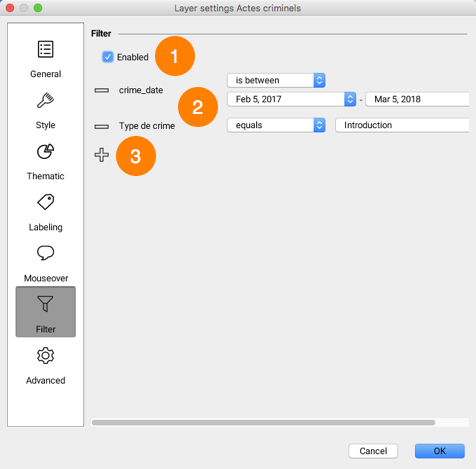
The configuration interface for a filter looks like this:

<figure><img src="https://content.gitbook.com/content/DUF1p2rT0hfE3QBlbbvE/blobs/AIjejT33bfbmAjIlzB3I/clip0027.png" alt=""><figcaption></figcaption></figure>

<table data-header-hidden><thead><tr><th width="81"></th><th></th></tr></thead><tbody><tr><td><strong>1</strong></td><td><p>Check the box to enable the filter. Items that do not pass the filter are not displayed in the layer. </p><p>You can disable the filter without deleting it.</p></td></tr><tr><td><strong>2</strong></td><td><p>Attributes that make up the filter. </p><p>Each attribute has an operator and an attribute value. </p><p>Operators vary depending on the attribute type.</p></td></tr><tr><td><strong>3</strong></td><td>Click the icon to add another attribute to the filter.</td></tr></tbody></table>

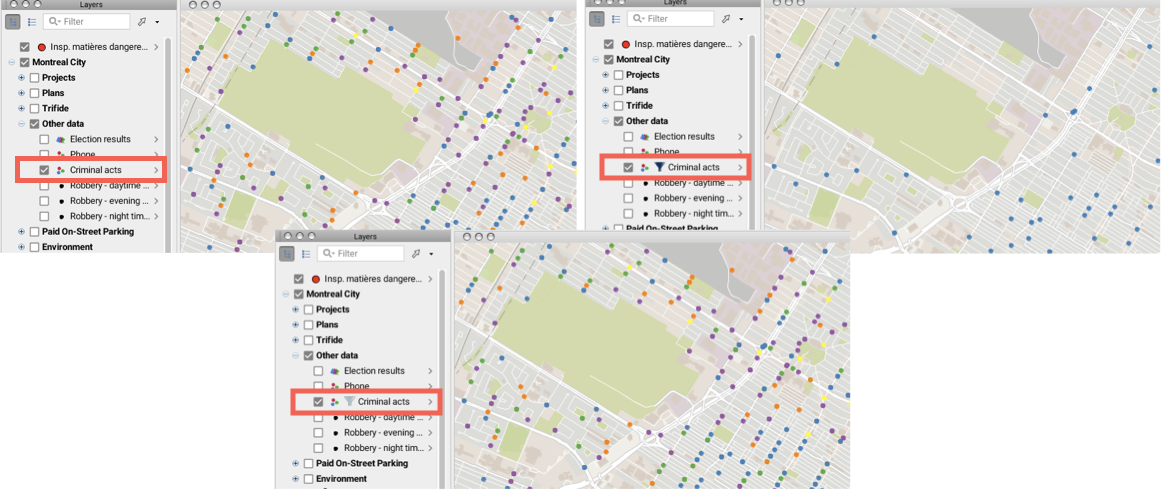
The ![img](https://content.gitbook.com/content/DUF1p2rT0hfE3QBlbbvE/blobs/uZ12btc5xj7ZS2l8ygOx/filtre.png) icon next to the layer name indicates that a filter is enabled. The filter can be disabled by unchecking the corresponding box. In this case all the elements of the layer are displayed and the ![img](https://content.gitbook.com/content/DUF1p2rT0hfE3QBlbbvE/blobs/lbc09mAG9OSm00wfgRuA/filtre_inactif.png) icon indicates that a filter is configured for the layer.

<figure><img src="https://content.gitbook.com/content/DUF1p2rT0hfE3QBlbbvE/blobs/7y2bgYLzfhfmfZ4ezNRg/clip0028.png" alt=""><figcaption></figcaption></figure>

## Filter operators

**equals**: This operator filters a layer's elements to display the elements whose attribute value (regardless of its type) is equal to one of the values selected by the JMap administrator or JMap Pro user.

**does not equal**: This operator filters a layer's elements to display the elements whose attribute value (regardless of its type) is different from the values selected by the the JMap administrator or JMap Pro user.

**greater than**: This operator filters a layer's elements to display the elements whose attribute value (numeric or date) is greater than the value selected by the JMap administrator or JMap Pro user.&#x20;

**greater or equal to**: This operator filters a layer's elements to display the elements whose attribute value (numeric or date) is greater than or equal to the value selected by the JMap administrator or JMap Pro user.

**less than**: This operator filters a layer's elements to display the elements whose attribute value (numeric or date) is less than the value selected by the JMap administrator or JMap Pro user.

**less or equal to**: This operator filters a layer's elements to display the elements whose attribute value (numeric or date) is less than or equal to the value selected by the JMap administrator or JMap Pro user.

**contains**: This operator filters a layer's elements to display the elements whose attribute value (text) contains the value selected by the JMap administrator or JMap Pro user.

**does not contain**: This operator filters a layer's elements to display the elements whose attribute value (text) does not contain the value selected by the JMap administrator or JMap Pro user.

**is empty**: This operator filters a layer's elements to display the elements whose attribute (text) does not have a value.

**is not empty**: This operator filters a layer's elements to display the elements whose attribute (text) has a value.

**is null**: This operator filters a layer's elements to display the elements whose attribute value (regardless of its type) is null.

**is not null**: This operator filters a layer's elements to display the elements whose attribute value (regardless of its type) is not null.

**is between**: This operator filters a layer's elements to display the elements whose attribute value (numeric or date) is within the range defined by the two values entered by the JMap administrator or JMap Pro user.

**is not between**: This operator filters a layer's elements to display the elements whose attribute value (numeric or date) is not within the range defined by the two values entered by the JMap administrator or JMap Pro user.

**last**: This operator filters a layer's elements to display the elements whose date attribute value is within the range (expressed in years, months, week(s), day(s), hour(s)) defined by the JMap administrator or JMap Pro user.

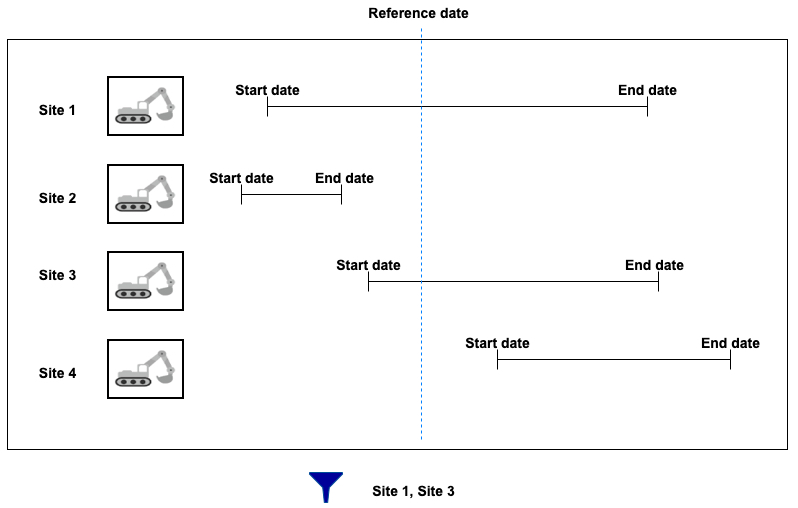
**interval**: This operator filters a layer's data based on time ranges defined using a start date, an end date and a reference date. The user therefore has a tool to display data that varies over time.

The layer must contain at least two date and/or timestamp attributes, one of these being the start Date/Time, and the other being the end Date/Time. The values of these dates can be NULL to indicate a start date that goes a long way back or an end date that is very far in the future.

A reference date is also needed. This date can be a specific date (in the past or in the future) or a current Date/Time, which indicates the present moment.

Only layer elements whose reference date is between the start and end date are displayed in the map.

The following figure illustrates this filter.

<figure><img src="https://content.gitbook.com/content/DUF1p2rT0hfE3QBlbbvE/blobs/hQ1Q8uDFHQTiZXnnR3Bt/clip_0082.jpg" alt=""><figcaption></figcaption></figure>