# General

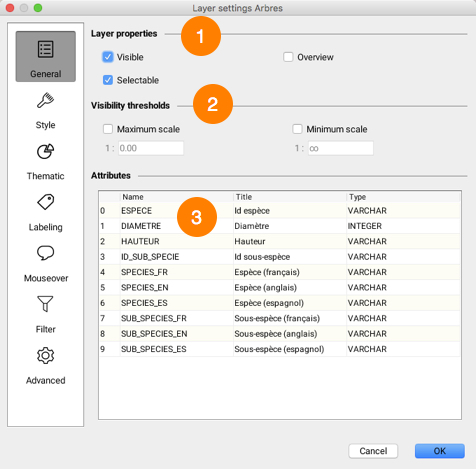
This section presents the layer's general settings.

<figure><img src="https://content.gitbook.com/content/DUF1p2rT0hfE3QBlbbvE/blobs/lMnFw21f6JkISjOoPIYQ/general.jpg" alt=""><figcaption></figcaption></figure>

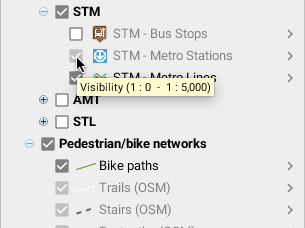
<table data-header-hidden><thead><tr><th width="84"></th><th></th></tr></thead><tbody><tr><td><strong>1</strong></td><td><strong>Visible</strong>: Determines whether the layer is visible or invisible. Only visible layers are displayed on the map. <br><strong>Selectable</strong>: Determines if layer elements are selectable. If this option is not selected, the elements of the layer cannot be selected using the selection tools. <br><strong>Overview</strong>: Adds layer to application overview. Overview can be enabled by selecting <strong>View->Map overview</strong> or by using the <strong>CTRL-O</strong> keyboard shortcut.</td></tr><tr><td><strong>2</strong></td><td><p>Visibility thresholds define the scale range within which a layer is displayed on the map. <br>If the displayed map scale does not fall within the minimum and maximum values, the layer will not be displayed. <br>If the options are not selected, thresholds will be ignored. If a layer is grayed out in the layer manager, this indicates that it is not displayed due to visibility thresholds.<br>Depending on what the JMap administrator has decided, it is possible that these options cannot be modified. </p><p><img src="https://content.gitbook.com/content/DUF1p2rT0hfE3QBlbbvE/blobs/oHIVkRS0f7LFfqs02I7v/seuils.jpg" alt="" data-size="original"></p></td></tr><tr><td><strong>3</strong></td><td>Attributes that are bound to the layer's elements are presented in this table. <br>Attribute titles and types are indicated. <br>Layer attributes are descriptive data associated with layer elements. <br>They are used for mouseover bubbles, labels, thematic maps, etc.</td></tr></tbody></table>