# Sharing Maps

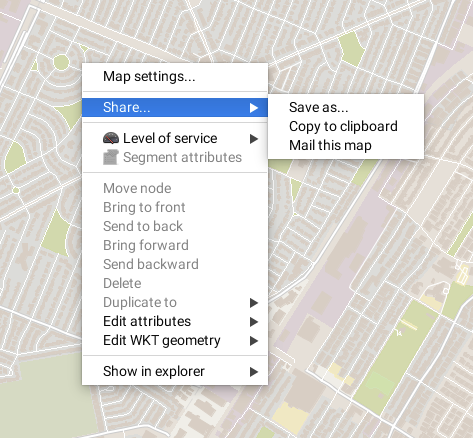
JMap allows you to create and share map images. You can copy a map to the clipboard and paste it into another application, send a map by email or save an image of the map in a file. These functions are accessed via the map's pop-up menu (right-click on the map).

<figure><img src="https://content.gitbook.com/content/DUF1p2rT0hfE3QBlbbvE/blobs/o8EIvSxJJRsHvL0LMehM/menu.png" alt=""><figcaption></figcaption></figure>

## Copying a Map to the Clipboard

You can copy a map to the clipboard and paste it to another application (word processor, presentation software, email, etc.). Access the pop-up menu by right-clicking on the map and selecting **Share... -> Copy to clipboard**. Afterwards, you can use the **Paste** function in the application that will receive the image.

## Saving a Map Image

You can save a map image in a file. Use the pop-up menu by right-clicking on the map and selecting **Share... -> Save as...**. You must then select a target directory and enter a name for the file.

## Sending a Map by Email

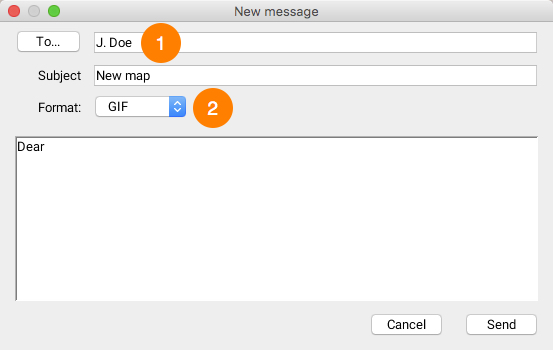
JMap allows you to send an image of a map by email. Use the pop-up menu by right-clicking on the map and choosing **Share... -> Mail this map**. You can select JMap users to whom you wish to send the map or enter the recipients directly in the designated field (use a semicolon (;) to separate addresses). Groups can be used as lists of recipients. The map will be added to the email as an attachment.

<figure><img src="https://content.gitbook.com/content/DUF1p2rT0hfE3QBlbbvE/blobs/PrjwzEdO3kLv0HHzW8Tt/courriel.jpg" alt=""><figcaption></figcaption></figure>

<table data-header-hidden><thead><tr><th width="79"></th><th></th></tr></thead><tbody><tr><td><strong>1</strong></td><td>Choose the email recipient among all JMap users by clicking on the <strong>To...</strong> button or enter the address of the recipient. <br>Enter a subject for your email.</td></tr><tr><td><strong>2</strong></td><td>Choose the image format to apply to the email attachment. <br>You can also enter text that will accompany the map image.</td></tr></tbody></table>
