# Attribute Queries

Attribute queries ![](https://content.gitbook.com/content/DUF1p2rT0hfE3QBlbbvE/blobs/VmCWlf4UOeIpkskivptf/attribute_request.gif) are used to find specific elements on a layer using the layer's attribute values. &#x20;

By entering search parameters in the search form (defined by the system administrator), a query is performed in order to select the map elements meeting the criteria and display them in the elements explorer.&#x20;

Contact your system administrator for more information on available queries.

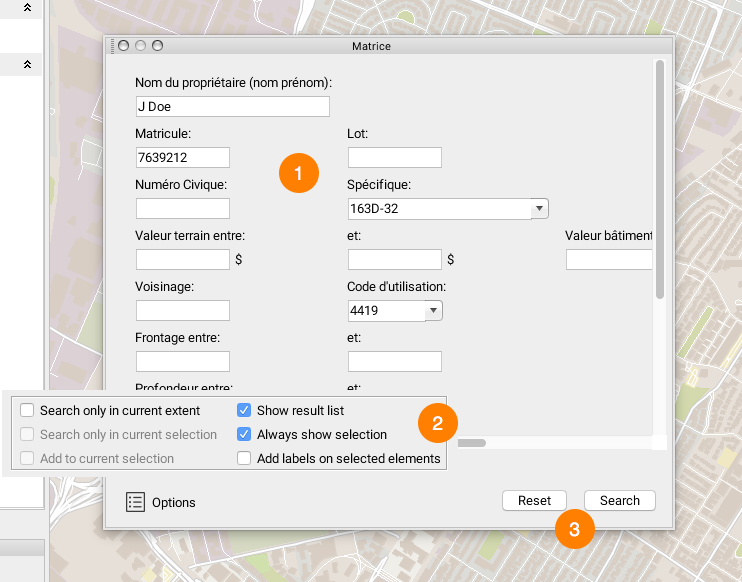
<figure><img src="https://content.gitbook.com/content/DUF1p2rT0hfE3QBlbbvE/blobs/U2QdgQUKYbO0jj5d09hu/requ-attr2.png" alt=""><figcaption></figcaption></figure>

<table data-header-hidden><thead><tr><th width="72"></th><th></th></tr></thead><tbody><tr><td><strong>1</strong></td><td>Enter data in the form's fields. <br>In this example, select the name of the element you are searching for in the list. <br>You can type just a few letters; the list will show the values that contain them.</td></tr><tr><td><strong>2</strong></td><td>Press the <strong>Options</strong> button to display a list of search options. <br>The following options are available: <br><strong>Search only in current extent</strong>: The query will only be performed in the visible area on the screen. <br><strong>Search only in current selection</strong>: The query will only be performed in the elements that have been previously selected. <br><strong>Add to current selection</strong>: The results of the query will be added to the elements on the map that have already been selected. <br><strong>Show result list</strong>: Displays the results list in the elements explorer. <br><strong>Always show selection</strong>: Displays results, even when these do not fall within the visibility thresholds of the layers that are queried (this is useful when results span a very large territory). <br><strong>Add labels on selected elements</strong>: Displays a label on each element that is found (improves visibility of results).</td></tr><tr><td><strong>3</strong></td><td>Press <strong>Search</strong> to launch the query. Press <strong>Reset</strong> to reset the form.</td></tr></tbody></table>

Results are selected on the map. If the **Show result list** option is selected, the [elements explorer](https://docs-jmapserver-lima.k2geospatial.com/e/applications/jmap-pro-user-guide/map-layers/elements-explorer) displays the elements returned by the query. It is then possible to launch an information report pertaining to the selection (refer to [Information Report](https://docs-jmapserver-lima.k2geospatial.com/e/applications/jmap-pro-user-guide/tools/information/information-report)).
