# Graphical Interface

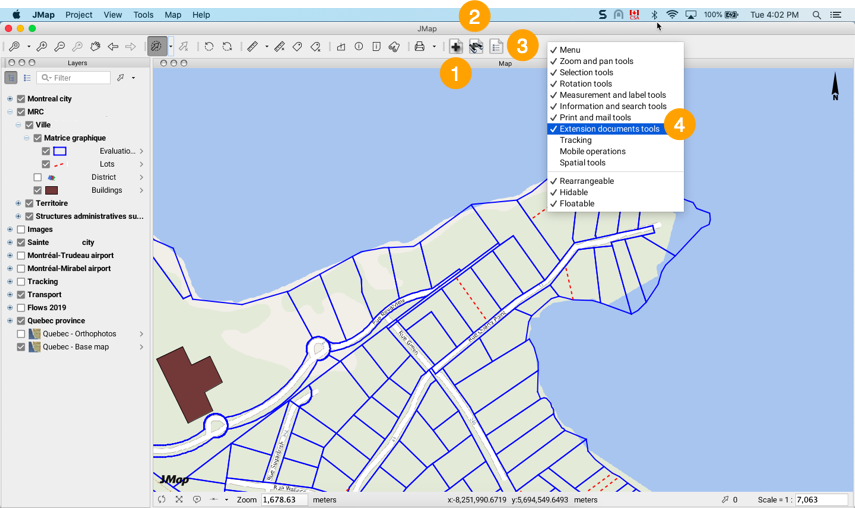
The graphical interface of the **Documents** extension consists of a set of buttons located in the application toolbar. Users can access the buttons they have been given permission to use.

<figure><img src="https://2224254070-files.gitbook.io/~/files/v0/b/gitbook-x-prod.appspot.com/o/spaces%2FDUF1p2rT0hfE3QBlbbvE%2Fuploads%2Fm7ueCRYv11ItNbUieni8%2Fclip_002.png?alt=media&#x26;token=26c6aae6-0141-451d-810a-cf9656760a7c" alt=""><figcaption></figcaption></figure>

<table data-header-hidden><thead><tr><th width="55"></th><th></th></tr></thead><tbody><tr><td><strong>1</strong></td><td>This button allows you to add documents and associate documents with a selection of map elements.</td></tr><tr><td><strong>2</strong></td><td>This button allows you to search for documents using keywords.</td></tr><tr><td><strong>3</strong></td><td>This button allows you to display the list of documents associated with a selection of map elements.</td></tr><tr><td><strong>4</strong></td><td>The Documents toolbar can be displayed or hidden using the pop-up menu of the JMap Pro toolbar.</td></tr></tbody></table>
