# Importing NMEA Data

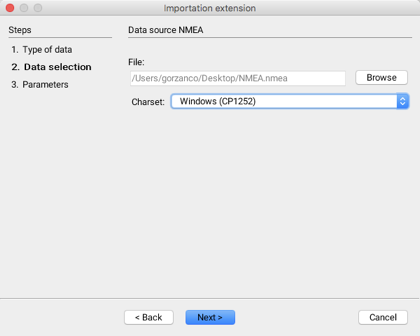
The second step in importing GPS data that meets NMEA standards involves selecting the data sets to import.

<figure><img src="https://content.gitbook.com/content/DUF1p2rT0hfE3QBlbbvE/blobs/YpIV18WA6utqKUSIl58v/clip_08_b.png" alt=""><figcaption></figcaption></figure>

<table data-header-hidden><thead><tr><th width="236"></th><th></th></tr></thead><tbody><tr><td>File</td><td>Select the NMEA file to import.</td></tr><tr><td>Windows (CP1252)</td><td>Select the character set used for the sentences of the NMEA file.<br>If this parameter is not properly defined, it is possible that some characters will not be properly displayed. <br>The default value is usually appropriate.</td></tr></tbody></table>

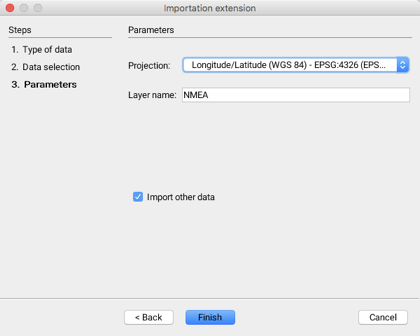
The third step allows you to configure the parameters of the layer that will be generated when the data is imported.

<figure><img src="https://content.gitbook.com/content/DUF1p2rT0hfE3QBlbbvE/blobs/KBKQlb9s9vj4zmf9fZBo/clip_09_b.png" alt=""><figcaption></figcaption></figure>

<table data-header-hidden><thead><tr><th width="199"></th><th></th></tr></thead><tbody><tr><td>Projection</td><td>For all NMEA sentences, the coordinates system is based on the WGS84 ellipsoid. <br>The proposed projection therefore includes this ellipsoid.</td></tr><tr><td>Layer name</td><td>The data will be imported into a layer whose name must be specified.</td></tr><tr><td>Import other data</td><td>It is possible to indicate that other data sets will be imported; this automatically brings you back to the first step.</td></tr></tbody></table>