# Interface graphique

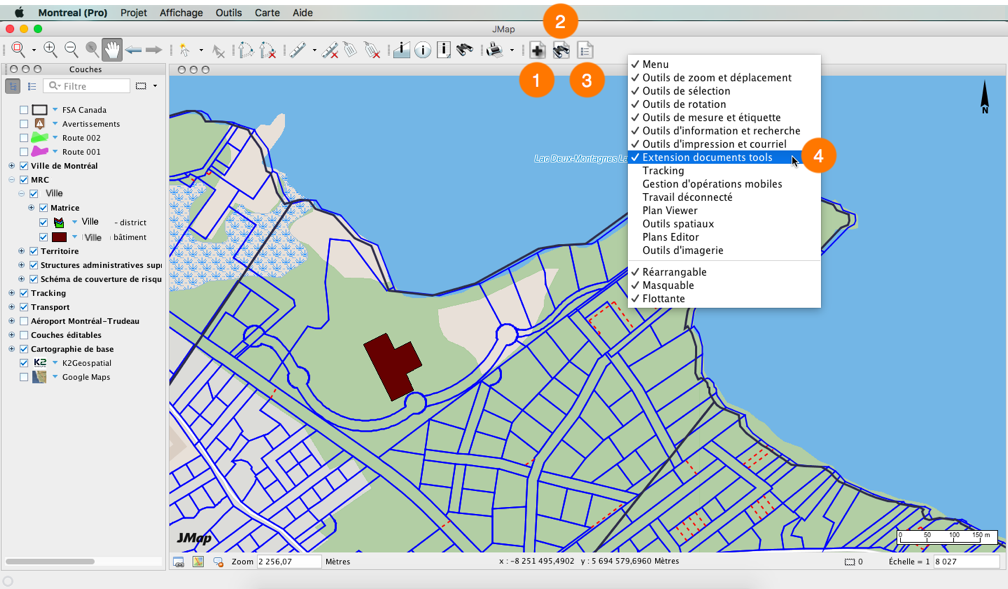
L'interface graphique de JMap Documents consiste en un ensemble de boutons localisés dans la barre d'outils de l'application JMap Pro. Vous pouvez accéder aux boutons pour lesquels vous avez des permissions.

<figure><img src="/files/M5wwLmzNzvqwxdd081iC" alt=""><figcaption></figcaption></figure>

<table data-header-hidden><thead><tr><th width="85.08771929824562"></th><th></th></tr></thead><tbody><tr><td><strong>1</strong></td><td>Bouton pour ajouter des documents et pour associer des documents à une sélection d'éléments cartographiques.</td></tr><tr><td><strong>2</strong></td><td>Bouton pour effectuer une recherche de documents sur la base de mots-clés.</td></tr><tr><td><strong>3</strong></td><td>Bouton pour afficher la liste des documents associés à une sélection d'éléments cartographiques.</td></tr><tr><td><strong>4</strong></td><td>La barre d'outils de Documents peut être affichée ou masquée au moyen du menu contextuel de la barre d'outils de JMap Pro.</td></tr></tbody></table>


---

# Agent Instructions: Querying This Documentation

If you need additional information that is not directly available in this page, you can query the documentation dynamically by asking a question.

Perform an HTTP GET request on the current page URL with the `ask` query parameter:

```
GET https://docs-jmapserver-lima.k2geospatial.com/f/extensions/guide-dutilisation-de-jmap-documents/documents-pour-jmap-pro/interface-graphique.md?ask=<question>
```

The question should be specific, self-contained, and written in natural language.
The response will contain a direct answer to the question and relevant excerpts and sources from the documentation.

Use this mechanism when the answer is not explicitly present in the current page, you need clarification or additional context, or you want to retrieve related documentation sections.
