# Export

## JMap Exportation User Guide

The JMap Exportation extension allows users of the JMap Pro application to export vector data from a project's layers towards files that have been saved locally on a user's computer.

You access the extension through the menu **Tools -> Layer exportation...**.

<figure><img src="https://content.gitbook.com/content/DUF1p2rT0hfE3QBlbbvE/blobs/jBMogCneVJ3q9DBlPIIe/clip_01.png" alt=""><figcaption></figcaption></figure>

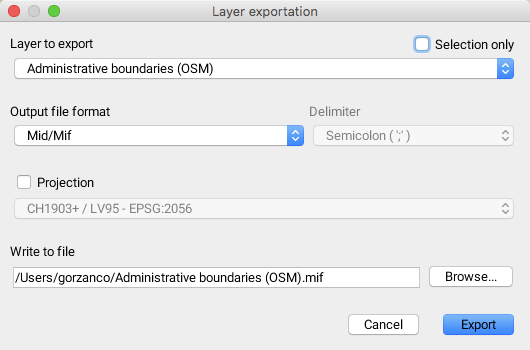
<table data-header-hidden><thead><tr><th width="196"></th><th></th></tr></thead><tbody><tr><td>Layer to export</td><td>Name of the layer to export.</td></tr><tr><td>Selection only</td><td>It is possible to export a subset of the elements that have been selected in the vector layer.</td></tr><tr><td>Output file format</td><td><p>The format of the output file must be selected. <br>The available format options are: </p><ul><li>MID/MIF, compatible with MapInfo applications; </li><li>SHAPE, compatible with Esri applications; </li><li>KML, compatible with Google Earth, Google Maps, Google Mobile and World Wind applications; </li><li>WKT, defined by the Open Geospatial Consortium (OGC) and</li><li>GeoJSON, the format based on JavaScript Object Notation.</li></ul></td></tr><tr><td>Projection</td><td>It is possible to select a projection system for the layer.</td></tr><tr><td>Write to file</td><td>Name of the file that will be saved in local mode.</td></tr></tbody></table>
