For the complete documentation index, see llms.txt. This page is also available as Markdown.

Export

JMap Exportation User Guide

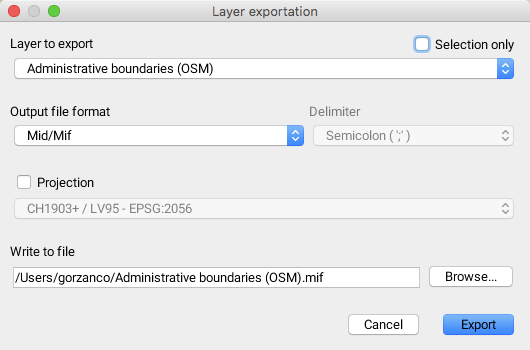
The JMap Exportation extension allows users of the JMap Pro application to export vector data from a project's layers towards files that have been saved locally on a user's computer.

You access the extension through the menu Tools -> Layer exportation....

Layer to export

Name of the layer to export.

Selection only

It is possible to export a subset of the elements that have been selected in the vector layer.

Output file format

The format of the output file must be selected. The available format options are:

  • MID/MIF, compatible with MapInfo applications;

  • SHAPE, compatible with Esri applications;

  • KML, compatible with Google Earth, Google Maps, Google Mobile and World Wind applications;

  • WKT, defined by the Open Geospatial Consortium (OGC) and

  • GeoJSON, the format based on JavaScript Object Notation.

Projection

It is possible to select a projection system for the layer.

Write to file

Name of the file that will be saved in local mode.